 Sebastian Schkudlara
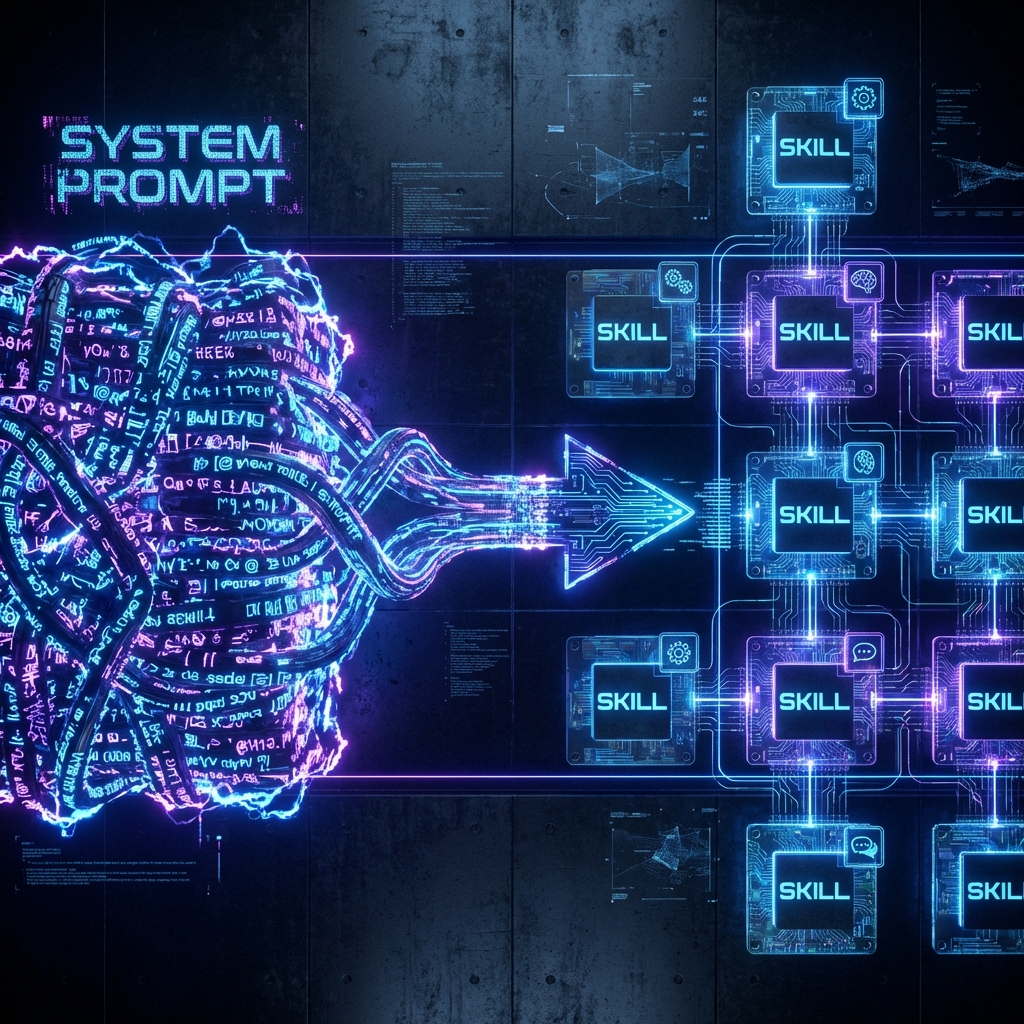
If you’ve spent any time building with modern AI agents, you’ve probably hit the same wall everyone else does: the bloated system prompt.
At first, a single claude.md or “rules” file feels powerful. You pack in brand voice, coding standards, design rules, security policies, deployment steps—everything your agent should know. But as projects grow, that monolith turns into a liability. The model’s context window fills up, your most important rules drift to the top and get ignored, and suddenly your “AI assistant” is forgetting the basics halfway through a session.
That’s not a tooling problem. It’s an architecture problem.
The solution that’s quietly becoming the new standard isn’t “better prompts”—it’s Agent Skills: small, modular, portable bundles of procedural knowledge that can be loaded exactly when needed and left out of the way the rest of the time.
This post walks through what those skills are, how they’re structured, why they matter for serious work, and how they play with integration standards like the Model Context Protocol (MCP).
Why Skills Exist: Escaping Context Fatigue
Think of context as the currency of reasoning. Every token the model sees—your instructions, chat history, code, logs—is competing for attention in a finite window.
With a single giant system prompt:
- Context efficiency is terrible – you “pay” for all the rules on every turn, whether or not they’re relevant.
- Recency bias works against you – the model naturally prioritizes whatever appears last, which is usually the latest messages, not the foundational rules at the top of the file.
- Maintenance becomes painful – that one giant file turns into an unmanageable policy graveyard.
Skills flip this around.
Instead of front‑loading everything, you create a library of modular capabilities. Each one is a portable SOP: “How to run a Stripe integration,” “How to perform a front-end design audit,” “How to train a model with Hugging Face,” “How to execute a technical SEO review,” and so on.
The agent doesn’t load all of them all the time. It only pulls a skill into context when it’s actually needed, keeping the active instruction set small, fresh, and focused.
That single change—on‑demand loading instead of one big prompt—solves a huge chunk of context fatigue.
What a Skill Actually Is: More Than Just a Markdown File
On disk, a skill is deceptively simple. It’s “just” a directory, usually under something like:
- Project scope:
.claude/skills/… - Global scope:
skills/…
Inside that directory lives the thing that really matters: skill.md.
You can think of that file as the skill’s ID card, brain, and playbook all in one:
- The YAML header at the top acts as the metadata and routing layer.
- The Markdown body contains the actual procedural knowledge: step‑by‑step instructions, checklists, role prompts, edge‑case logic.
- The file can also act as a resource map, pointing to scripts, templates, or reference docs in the same folder.
A typical production skill directory might look like this:
skills/frontend-design/skill.md← entry point + instructionsscripts/← e.g.lint_and_audit_ui.pyreferences.md← design system, edge casestemplates/← boilerplate, report formats
That simplicity is deliberate. Because the structure is standardized, a skill you write for one agent ecosystem (Claude, Cursor, Vercel, etc.) can be reused almost anywhere that understands the Agent Skills open standard.
The YAML Header: Tiny Metadata, Huge Impact
The most powerful part of a skill is also the smallest: the YAML header at the top of skill.md.
The agent’s orchestration layer doesn’t start by loading the entire document. It starts by scanning those headers across all installed skills and asking a simple question:
“Given what the user just asked, which of these descriptions sounds like the right tool to pull in?”
That’s why the header matters so much. Common fields include:
name– How the skill shows up in UIs and slash commands (frontend-design,stripe-integration, etc.).description– The semantic trigger. This is the text the model compares to the user’s request to decide whether to load the skill at all.userInvocable/user_invocable– Whether the user can call it explicitly via/skill-name.disableModelInvocation– If true, the model can’t auto‑trigger it; it only runs when a human explicitly calls it.context– Often set toforkto run the skill in a sub‑agent sandbox, keeping noisy logs and intermediate work out of the main conversation.arguments/ argument hints – How dynamic data (like issue IDs, URLs, file paths) can be passed in (``,$Arguments,$0, etc.).tools– Which tools the agent is allowed to use while running this skill (e.g. onlybashandread_file).
The key insight: before a skill is loaded, the model sees only this metadata.
That means your description isn’t documentation fluff—it’s the logic gate that protects your context window. A vague description leads to missed opportunities or constant over‑triggering. A precise, conditional description (“Use this ONLY if…”) turns the skill into a well‑behaved specialist.
Just‑in‑Time Expertise: How Skills Are Triggered
Once you have a library of skills installed, how does the agent actually use them?
The flow looks like this:
- Intent scanning
For each turn, the agent takes the latest user request and semantically compares it against thedescriptionof every installed skill. - Decision
If one (or a small set) of skills looks relevant, the agent decides to load them. - Injection
The fullskill.mdbody is then pulled into the conversation—but only at that moment, right where it matters most, near the latest messages.
This has two big advantages:
- Context conservation – Skills that aren’t relevant simply never enter the context. You don’t pay for them.
- Recency bias in your favor – The skill’s instructions land at the bottom of the stack, where the model is naturally paying the most attention.
You can combine this with different invocation styles:
- Automatic intent matching – The model triggers skills when it recognizes a match.
- Manual slash commands – You call skills directly (
/frontend-design,/seo-audit). - Sub‑agent delegation – A “primary” agent can spin up a more specialized one, equipped with a specific skill set, to handle a complex subtask.
All of this happens without bloating your main system prompt.
Execution in Practice: Recency Bias, Forking, and Clean Chats
Once a skill is loaded, its instructions become the model’s temporary prime directive.
In practical terms, the context might look like this:
- System prompt (long‑lived, broad rules)
- Conversation history (growing over time)
- Latest user message (“Refactor this TypeScript and improve the UI.”)
- Skill injection – e.g. the “Frontend Design” skill body describing layout heuristics, spacing, typography, and component guidelines
The model now reasons primarily under the influence of that injected skill. This is a deliberate exploitation of recency bias: the most relevant SOPs are always the freshest.
For heavy‑duty tasks—like long refactors, multi‑file reads, running test suites, or large batch operations—skills can specify context: fork. That tells the orchestration layer:
“Create a sub‑agent sandbox for this work. Keep its noisy logs and intermediate reasoning out of the main chat. When it’s done, just bring back the final result.”
The result is a cleaner primary conversation, lower token usage, and better signal‑to‑noise for both you and the model.
Designing Production‑Grade Skills (Not Just Fancy Prompts)
It’s possible to slap together a skill.md in a few minutes. It’s much harder—and more valuable—to design one that’s production‑ready.
Some patterns that consistently show up in mature skills:
- Rigid directory structure
- A
skills/root. - One subfolder per capability (
model-trainer,frontend-design,seo-audit, …). - A mandatory
skill.mdper folder. - Optional
scripts/,references.md,templates/to keep heavy logic and docs out of the core instructions.
- A
- Three‑layer content model
- Metadata (5%) – Just enough to route correctly.
- Core instructions (30%) – The actual SOP, written clearly in Markdown.
- References & scripts (65%) – External assets: how‑tos, cost calculators, dataset inspectors, templates.
- Iterative development loop
- Initialize the scaffolding (often via a dedicated “Skill Creator” skill).
- Draft the first version of the SOP.
- Test it in realistic scenarios.
- Tighten the YAML description and arguments.
- Add edge‑case logic and references.
- Re‑test until outputs are consistently “production‑grade,” not “AI slop.”
- Governance and security
- Treat third‑party skills like third‑party code: audit them.
- Maintain an internal skill marketplace (usually a private repo) so your team installs from a vetted, version‑controlled source.
- Use flags like
disableModelInvocationand scoped installs to avoid surprises.
This is the moment where documentation stops being “static text” and becomes agent‑ready infrastructure.
From Chat‑First to Skill‑First: Killing “AI Slop”
One of the biggest benefits teams report after adopting skills is the near disappearance of generic, obviously‑synthetic output.
Why? Because skills encode procedural rigor.
Instead of a vague instruction like “Write a landing page in our brand voice,” a skill might:
- Reference your exact typography scale and spacing tokens.
- Enforce layout patterns (hero → value props → proof → CTA).
- Call out misuse of brand colors or tone.
- Require multi‑perspective checks (e.g. “review as PM, as engineer, as QA”).
Similarly, a “Stripe Integration” skill doesn’t just “add payments.” It encodes:
- API route structure.
- Webhook configuration.
- Subscription tier logic.
- Database schema conventions.
- Error‑handling expectations.
Once these are codified into skill.md + references + scripts, they become portable SOPs your agents can follow again and again with very little drift.
That’s the difference between a demo and a reliable system.
Where MCP Fits In: Skills vs. Integrations
So if skills are this powerful, where does Model Context Protocol (MCP) come in?
The short answer:
- Skills are the reasoning and SOP layer.
- MCP is the connectivity and execution layer.
Skills answer questions like:
- “What’s the right sequence of steps to run this SEO audit?”
- “How should we design this UI according to our brand system?”
- “What’s the checklist before deploying to production?”
MCP answers questions like:
- “Where do I fetch the live data from?”
- “How do I write this file to Google Drive or GitHub?”
- “Which database or API should I call to complete this step?”
In a mature architecture, you don’t choose between them. You compose them:
- A skill describes how to execute a workflow.
- The skill then calls MCP tools at specific steps to read or write real‑world data.
For example:
- A Google Drive MCP gives the agent hands: list folders, read Docs, download files, upload assets.
- A Drive‑aware skill defines the SOP: how to structure social media drafts, where to save them, how to name files, how to keep everything consistent across campaigns.
The result is a modular stack where:
- Skills keep your reasoning efficient and consistent.
- MCP keeps your integrations live and secure.
Real-World Example: We recently released Google Drive Forge, an autonomous MCP server that demonstrates exactly this pattern—using skills to forge new capabilities on top of the Drive API.
Scoping and Deployment: Global vs. Project‑Specific
Once you start building a library of skills, you have to decide where to install them.
A useful mental model:
- Global installs
For high‑utility, cross‑project tools:- “Skill Creator”
- Generic “Code Explainer”
- “Google Drive Content Sync”
- “SEO Technical Scanner”
- Project‑specific installs
For anything that encodes local business logic:- A design system for a particular brand.
- A payments stack unique to one product.
- Customer‑specific workflows.
- Internal review processes you don’t want leaking into other repos.
CLIs like skills.sh and npx skills add owner/repo make this manageable: you can bootstrap, install, symlink, and update skills the same way you would manage a small internal package ecosystem.
As your library matures, you end up with a shared skill marketplace inside your organization—versioned, audited, and discoverable.
The Strategic Payoff: 10x Context Efficiency and Future‑Proof Agents
When you zoom out, the move to skills isn’t a cosmetic tweak. It’s a strategic shift in how we think about AI systems.
Instead of:
- One giant prompt,
- A tangle of ad‑hoc instructions,
- And brittle, copy‑pasted “prompt templates,”
you get:
- A modular library of portable, well‑scoped capabilities.
- A clear separation between:
- Reasoning (Skills) and
- Execution (MCP + tools).
- A context window that’s used for the problem at hand, not for carrying around every rule you’ve ever written.
For enterprises, that translates into:
- Less token waste.
- More consistent outputs.
- Easier audits and compliance.
- Faster onboarding (“install the same skill set the rest of the team uses”).
- A documentation culture that’s finally aligned with how agents actually work.
The real question now isn’t “How do we prompt this model better?”
It’s:
“Which of our workflows are repeatable, high‑value, and worth turning into portable skills right now—and how do we pair them with the right MCP integrations so our agents can actually act on them?”
Answer that, and you’re not just chatting with an AI anymore.
You’re orchestrating a growing ecosystem of skills—each one a focused, reusable piece of procedural knowledge that your agents can install, invoke, and trust.
 Beyond the Chatbot: Inside the First AI-Native Society